| 1 |
# SaveUtils – FreeCAD Workbench Addon |
| 2 |
|
| 3 |
 |
| 4 |
|
| 5 |
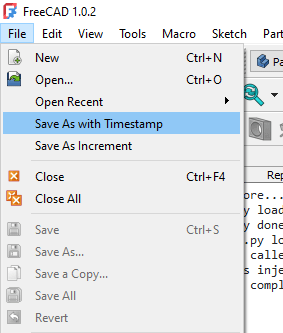
[SaveUtils](https://github.com/jefe317/SaveUtils/) adds two convenience commands to FreeCAD's **File** menu: |
| 6 |
|
| 7 |
| Command | What it does | |
| 8 |
|---|---| |
| 9 |
| **Save As with Timestamp** | Saves a copy as `<basename>-YYYYMMDD-HHMMSS.FCStd` | |
| 10 |
| **Save As Increment** | Saves a copy as `<basename>-01.FCStd`, `…-02.FCStd`, etc. | |
| 11 |
|
| 12 |
Both commands switch FreeCAD to the newly saved file so you keep working in it. |
| 13 |
|
| 14 |
## Behavior details |
| 15 |
|
| 16 |
### Save As with Timestamp |
| 17 |
- Pattern appended: `-YYYYMMDD-HHMMSS.FCStd` |
| 18 |
- If the current filename already ends with this pattern it is **replaced**, not doubled. |
| 19 |
`design-20240101-120000.FCStd` → `design-20240315-093045.FCStd` |
| 20 |
- Unsaved document: a file-picker dialog asks for a base filename first. |
| 21 |
|
| 22 |
### Save As Increment |
| 23 |
- Pattern appended: `-NN.FCStd` (always zero-padded to 2 digits). |
| 24 |
- If the filename already ends with `-N.FCStd` or `-NN.FCStd` the number is incremented: |
| 25 |
`design-03.FCStd` → `design-04.FCStd` |
| 26 |
`design-8.FCStd` → `design-09.FCStd` |
| 27 |
- Unsaved document: a file-picker dialog asks for a base filename first. |
| 28 |
|
| 29 |
## Installation |
| 30 |
|
| 31 |
### Manual |
| 32 |
|
| 33 |
Add this repository to your Addon Custom Repositories |
| 34 |
1. In FreeCAD, go to Edit > Preferences > Addon Manager. |
| 35 |
2. Under Costom Repositories, click the green plus button to Add https://github.com/jefe317/SaveUtils/ with the branch main. |
| 36 |
3. Click Apply, close the Preferences window. |
| 37 |
4. In Tools > Addon Manager, you can now search for "SaveUtils" and install it via the Install button. |
| 38 |
5. Restart FreeCAD. |
| 39 |
The two items appear near the top of **File → Save As with Timestamp / Save As Increment**. |
| 40 |
|
| 41 |
### Via Addon Manager |
| 42 |
|
| 43 |
If this repo is listed in a custom addon source, you can install it through |
| 44 |
**Tools > Addon Manager > Search for SaveUtils > Install**. |
| 45 |
|
| 46 |
## Requirements |
| 47 |
|
| 48 |
- FreeCAD 0.20 or later |
| 49 |
- PySide2 (bundled with FreeCAD) |
| 50 |
|
| 51 |
## License |
| 52 |
|
| 53 |
GPL v3 |
| 54 |
|